Hi,

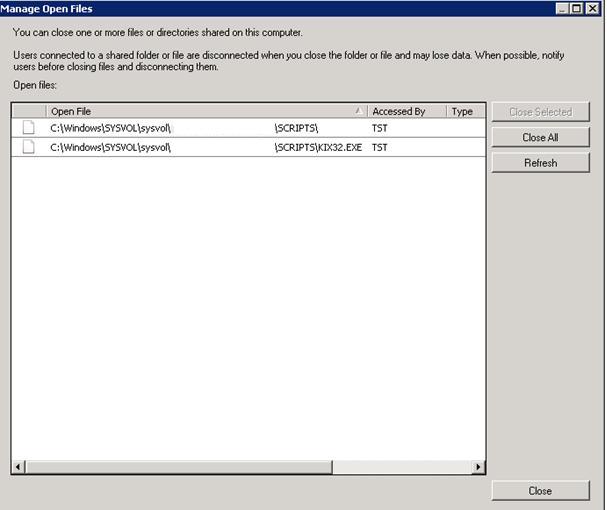
I’m testing Xenapp 6 on Windows Server 2008 R2. When I logon to our Windows 2008 domain using KIX version 4.61, kix32.exe stays open on the domain controller. We use a simple Kix logon script for mapping drives and distributing shortcuts to a personal folder in the users startmenu. It’s seems the script is running because all the mappings are created and the shortcuts are there. I think it’s the combination Windows Server 2008 R2 / KIX. Because we use the same script for Presentation Server 4.5 on Windows 2003 servers and there we don't see this problem. Does anybody know why kix32.exe does not quit?

Example Logon.bat:

 Code:
@echo off

IF %COMPUTERNAME% == CTRX-01 GOTO XENAPP
IF %COMPUTERNAME% == CTRX-02 GOTO XENAPP
IF %COMPUTERNAME% == CTRX-03 GOTO XENAPP

:XENAPP
"%LOGONSERVER%\NETLOGON\KIX32.exe" "%LOGONSERVER%\NETLOGON\LOGONSCRIPT.KIX" /f
GOTO END

:END


Example logonscript.kix:

 Code:
; Create Drives ***********

USE * /DELETE
USE N: \\APPL-01\apps
USE O: \\APPL-02\apps
USE P: \\APPL-03\apps
USE Q: \\APPL-04\apps
USE R: \\APPL-05\apps
USE W: @HOMESHR

IF INGROUP("ApplTopdesk")
USE K: \\appl-01\documents
Endif

; Start Group Evaluation ***********

IF INGROUP("ApplAccess")
COPY "Q:\Xenapp\SPECAPPS\Microsoft Access 2010.lnk" "W:\StartMenu\Programs\Persoonlijk\"  
ENDIF
 
IF INGROUP("ApplXmind")
COPY "Q:\Xenapp\SPECAPPS\Xmind.lnk" "W:\StartMenu\Programs\Persoonlijk\"
ENDIF

IF INGROUP("ApplKlicViewer")
COPY "Q:\Xenapp\SPECAPPS\Klic-viewer.lnk" "W:\StartMenu\Programs\Persoonlijk\"
ENDIF

Exit


Attachments
213.jpg
Description:


Edited by Jeroenski74 (2010-09-16 05:22 PM)