#177684 - 2007-07-10 01:51 PM
 SQL Database Explorer
|
Arend_

MM club member


Registered: 2005-01-17
Posts: 1896
Loc: Hilversum, The Netherlands
|
Working in SQL lately and finding MsSQL a bitch to view databases and tables in, I wrote my own app that shows everything I needed, I guess this will be handy to alot of people, so take a look. KixForms.Net and a valid MS SQL server are neccesary.
[edit]
New version yet again. Updates:
1) Flickering of the ListView when it gets updated is fixed in the script by Shawn.
2) Shawn added the resizing feature so you can maximize the window and the controls resize with it.
3) I updated the Selection of databases to enable/disable the IP Address box when selecting the appropriate database type.
[/edit]
$=SetOption('Explicit','On')

Global $System, $nul, $Form1, $listView1, $TreeView1, $Label0, $Label1, $Label2, $Label3
Global $Panel1, $Panel2, $Splitter1
Global $TextBox1, $TextBox2, $TextBox3, $Button1, $ComboBox1, $CMDString
Global $Margin

$System = CreateObject("Kixforms.System")
If NOT $System
   $nul= MessageBox("KiXforms.Net Not Initiated. This Script Will Now Close.","Error",16)
   Quit()
EndIf
$nul = $System.Application.EnableVisualStyles

$Margin = 10

$Form1 = $System.Form()
$Form1.Left = 345
$Form1.StartPosition = 0  ;FormStartPosition_Manual
$Form1.Size = $System.Size(250,510) ;(Width,Height)
$Form1.Text = "KiXforms DB Explorer"
$Form1.Top = 133

$Panel1 = $System.Panel()
$Panel1.Dock = $System.DockStyle_Fill
$Panel1.DockPadding.All = $MARGIN
$Panel1.DockPadding.Left = 0

$nul = $Form1.Controls.Add($Panel1)

$Splitter1 = $System.Splitter()
$Splitter1.Dock = $System.DockStyle_Left
$Splitter1.MinSize = 175

$nul = $Form1.Controls.Add($Splitter1)

$Panel2 = $System.Panel()
$Panel2.Dock = $System.DockStyle_Left
$Panel2.Width = $Form1.ClientWidth
$nul = $Form1.Controls.Add($Panel2)

$ListView1 = $System.ListView()
$ListView1.FullRowSelect = 1
$ListView1.View = $System.View_Details
$ListView1.Dock = $System.DockStyle_Fill
$nul = $Panel1.Controls.Add($ListView1)

$TreeView1 = $System.TreeView()
$TreeView1.Height = 320
$TreeView1.Left = $MARGIN
$TreeView1.Top = $MARGIN
$TreeView1.Width = $Panel2.ClientWidth - ($MARGIN)
$TreeView1.Click = "UpdateNode()"
$TreeView1.Anchor = 15

$nul = $Panel2.Controls.Add($TreeView1)

$ComboBox1 = $System.ComboBox()
$ComboBox1.Left = 80
$ComboBox1.Text = "Select DB Type..."
$ComboBox1.Top = 340
$ComboBox1.Width = 147
$ComboBox1.SelectedIndexChanged = "DBIndex"
$ComboBox1.Anchor = 2+4+8

$nul = $Panel2.Controls.Add($ComboBox1)
$=$ComboBox1.Items.Add("Microsoft SQL")
$=$ComboBox1.Items.Add("MySQL")
$=$ComboBox1.Items.Add("Microsoft Access")

$Label0 = $System.Label()
$Label0.BorderStyle = 0  ;FixedSingle
$Label0.Left = 15
$Label0.Text = "DB Type:"
$Label0.Top = 342
$Label0.Height = 20
$Label0.Width = 60
$Label0.Anchor = 2+4
$nul = $Panel2.Controls.Add($Label0)

$Label1 = $System.Label()
$Label1.BorderStyle = 0  ;FixedSingle
$Label1.Left = 15
$Label1.Text = "Server IP:"
$Label1.Top = 367
$Label1.Height = 20
$Label1.Width = 60
$Label1.Anchor = 2+4
$nul = $Panel2.Controls.Add($Label1)

$Label2 = $System.Label()
$Label2.BorderStyle = 0  ;FixedSingle
$Label2.Left = 15
$Label2.Text = "Username:"
$Label2.Top = 392
$Label2.Height = 20
$Label2.Width = 60
$Label2.Anchor = 2+4
$nul = $Panel2.Controls.Add($Label2)

$Label3 = $System.Label()
$Label3.BorderStyle = 0  ;FixedSingle
$Label3.Left = 15
$Label3.Text = "Password:"
$Label3.Top = 417
$Label3.Height = 20
$Label3.Width = 60
$Label3.Anchor = 2+4
$nul = $Panel2.Controls.Add($Label3)

$TextBox1 = $System.TextBox()
$TextBox1.Left = 80
$TextBox1.Text = ""
$TextBox1.Top = 365
$TextBox1.Width = 147
$TextBox1.Anchor = 2+4+8
$nul = $Panel2.Controls.Add($TextBox1)

$TextBox2 = $System.TextBox()
$TextBox2.Left = 80
$TextBox2.Text = ""
$TextBox2.Top = 390
$TextBox2.Width = 147
$TextBox2.Anchor = 2+4+8
$nul = $Panel2.Controls.Add($TextBox2)

$TextBox3 = $System.TextBox()
$TextBox3.Left = 80
$TextBox3.Text = ""
$TextBox3.Top = 415
$TextBox3.Width = 147
$TextBox3.PasswordChar = "*"
$TextBox3.Anchor = 2+4+8
$nul = $Panel2.Controls.Add($TextBox3)

$Button1 = $System.Button()
$Button1.Left = 15
$Button1.Text = "Connect"
$Button1.Top = 440 ;415
$Button1.Width = 212
$Button1.Click = "$$=DBConnect()"
$Button1.Anchor = 2+4+8
$nul = $Panel2.Controls.Add($Button1)

;; Adjust form to width of left panel...

$Form1.ClientWidth = $Panel2.Right+$MARGIN

$Form1.Show  ;Displays the Form

While $Form1.Visible
   $Nul = Execute($Form1.DoEvents())
Loop
Exit 0

Function DBIndex
  If $ComboBox1.Text = "Microsoft Access"
    $TextBox1.Enabled = 0
  Else
    $TextBox1.Enabled = 1
  EndIf
endfunction

Function DBConnect
  If $TextBox2.Text <> "" AND $TextBox3.Text <> "" AND $ComboBox1.Text <> "Select SQL Type..."
    If $ComboBox1.Text = "Microsoft SQL"
      If TextBox1.Text <> ""
        $CMDString = 'Driver={SQL Server};Server='+$TextBox1.Text+';uid='+$TextBox2.Text+';pwd='+$TextBox3.Text+';'
        DBControl($CMDString,"SELECT Name FROM SysDatabases")
      Else
        $nul= MessageBox("The Server IP Address is not specified.","Error",16)
      EndIf
    EndIf
    If $ComboBox1.Text = "MySQL"
      If TextBox1.Text <> ""
        $CMDString = 'Driver={MySQL ODBC 3.51 Driver};Option=16387;Server='+$TextBox1.Text+';uid='+$TextBox2.Text+';pwd='+$TextBox3.Text+';'
        DBControl($CMDString,"Show Databases")
      Else
        $nul= MessageBox("The Server IP Address is not specified.","Error",16)
      EndIf
    EndIf
    If $ComboBox1.Text = "Microsoft Access"
      Dim $DBPath, $dbq
      $dbq = CreateObject("userAccounts.commonDialog")
      $dbq.filter = "Microsoft Access Database (*.mdb)|*.mdb"
      $dbq.showopen
      $DBPath = $dbq.fileName
      If $DBPath
        $CMDstring = 'DRIVER={Microsoft Access Driver (*.mdb)};uid='+$TextBox2.Text+';pwd='+$TextBox3.Text+';DBQ='+$DBPath+";"
        DBAccess($DBPath)
      Else
        $nul= MessageBox("There is not Database Selected.","Error",16)
      EndIf
    EndIf
  Else
    $nul= MessageBox("Not all fields are filled.","Error",16)
  EndIf
EndFunction

Function UpdateNode
  Dim $SelectedItem, $node, $cna, $rsa, $item, $i
  $TreeView1.Enabled = 0
  $Button1.Enabled = 0
  $SelectedItem = $Treeview1.SelectedNode.Text
  $Node = $Treeview1.SelectedNode
  If Right($Node.Parent.Text,6) = "Tables"
    $Form1.Size = $System.Size(650,510)
    If NOT $ComboBox1.Text = "Microsoft Access"
      $CMDString = $CMDString + "Database="+$Node.Parent.Parent.Text+";"
    EndIf
    $cna = CreateObject("ADODB.Connection")
    $cna.ConnectionTimeOut = 15
    $cna.CommandTimeOut = 30
    $cna.Open($CMDstring)
    If $cna.State <> 1
      $nul= MessageBox($CMDString,"Error",16)
      $nul= MessageBox(@SERROR + @CRLF + @CRLF + "This Script Will Now Close.","Error",16)
      Quit()
    Else
      $=$ListView1.Columns.Clear
      $=$ListView1.Items.Clear
      $rsa = CreateObject("ADODB.RecordSet")
      $rsa.CursorType = 3
      $rsa.LockType = 3
      $rsa.Source = "SELECT * From "+$selecteditem
      $rsa.ActiveConnection = $cna
      $rsa.Open
      $rsa.MoveFirst
      $Form1.UseWaitCursor = 1
      $ListView1.BeginUpdate
      For Each $item in $rsa.Fields
        $=$ListView1.Columns.Add($System.ColumnHeader($item.Name,100,$System.HorizontalAlignment_Left))
      Next
      $rsa.MoveFirst
      While NOT $rsa.EOF
        Dim $x
        $x = 1
        For Each $item in $rsa.Fields
          If $x = 1
            $i=$ListView1.Items.Add($System.ListViewItem($item.Value))
          Else
            $=$i.SubItems.Add($System.ListViewSubItem($item.value))
          EndIf
          $x = $x + 1
        Next
        $rsa.MoveNext
      Loop
    EndIf
    $ListView1.EndUpdate
    $Form1.UseWaitCursor = 0
    $cna.Close
    $rsa.Close
  EndIf
  $TreeView1.Enabled = 1
  $Button1.Enabled = 1
  $node = ""
EndFunction

Function DBAccess($mdbfile)
  Dim $TreeView1Node0, $cn, $rs, $a, $b
  $TreeView1Node0 = $TreeView1.Nodes.Add($System.TreeNode("MS Access - " + $mdbfile))
  $TreeView1Node0.NodeFont = $System.Font("Microsoft Sans Serif",8.25,0) ;Regular
  $cn = CreateObject("ADODB.Connection")
  $cn.Open("Provider=Microsoft.Jet.OLEDB.4.0;Data Source="+$mdbfile)
  If $cn.State <> 1
    $nul= MessageBox(@SERROR + @CRLF + @CRLF + "This Script Will Now Close.","Error",16)
    Quit()
  EndIf
  $rs = $cn.OpenSchema(20)
  $rs.MoveFirst
  $a = $TreeView1Node0.Nodes.Add($System.TreeNode("Tables"))
  While NOT $rs.EOF
    $b = $A.Nodes.Add($System.TreeNode($rs.Fields.Item("TABLE_NAME")))
    $rs.MoveNext
  Loop
EndFunction

Function DBControl($CNString,$CMDtxt)
  Dim $TreeView1Node0, $cn, $rs, $CNString2, $item, $itm, $cn2, $rs2, $rs3, $a, $b, $c, $d, $e
  $TreeView1.Enabled = 0
  $Button1.Enabled = 0
  $TreeView1Node0 = $TreeView1.Nodes.Add($System.TreeNode("Databases"))
  $TreeView1Node0.NodeFont = $System.Font("Microsoft Sans Serif",8.25,0) ;Regular
  $cn = CreateObject("ADODB.Connection")
  $cn.ConnectionTimeOut = 15
  $cn.CommandTimeOut = 30
  $cn.Open($CNstring)
  If $cn.State <> 1
    $nul= MessageBox(@SERROR + @CRLF + @CRLF + "This Script Will Now Close.","Error",16)
    Quit()
  EndIf
  $rs = CreateObject("ADODB.RecordSet")
  $rs.CursorType = 3
  $rs.LockType = 3
  $rs.Source = $CmdTxt
  $rs.ActiveConnection = $cn
  $rs.Open
  $rs.MoveFirst
  While NOT $rs.EOF
    For Each $item In $rs.Fields
      $cn2 = CreateObject("ADODB.Connection")
      $cn2.ConnectionTimeOut = 15
      $cn2.CommandTimeOut = 30
      $CNstring2 = $CNstring + "Database=" + $item.Value+ ";"
      $cn2.Open($CNString2)
      If $cn2.State <> 1
        $nul= MessageBox(@SERROR + @CRLF + @CRLF + "This Script Will Now Close.","Error",16)
        Quit()
      EndIf

      $a = $TreeView1Node0.Nodes.Add($System.TreeNode($item.Value))
      If $ComboBox1.Text = "Microsoft SQL"
        $b = $A.Nodes.Add($System.TreeNode("U-Type Tables"))
        $c = $A.Nodes.Add($System.TreeNode("V-Type Tables"))

        $rs2 = CreateObject("ADODB.RecordSet")
        $rs2.CursorType = 3
        $rs2.LockType = 3
        $rs2.Source = "SELECT Name FROM SysObjects Where Type='U'"
        $rs2.ActiveConnection = $cn2
        $rs2.Open
        $rs2.MoveFirst
        While NOT $rs2.EOF
          For Each $itm In $rs2.Fields
            $d = $b.Nodes.Add($System.TreeNode($itm.Value))
          Next
          $rs2.MoveNext
        Loop
        $rs2.Close

        $rs3 = CreateObject("ADODB.RecordSet")
        $rs3.CursorType = 3
        $rs3.LockType = 3
        $rs3.Source = "SELECT Name FROM SysObjects Where Type='V'"
        $rs3.ActiveConnection = $cn2
        $rs3.Open
        $rs3.MoveFirst
        While NOT $rs3.EOF
          For Each $itm In $rs3.Fields
            $e = $c.Nodes.Add($System.TreeNode($itm.Value))
          Next
          $rs3.MoveNext
        Loop
        $rs3.Close
      EndIf
      If $ComboBox1.Text = "MySQL"
        $b = $A.Nodes.Add($System.TreeNode("Tables"))
        $rs2 = CreateObject("ADODB.RecordSet")
        $rs2.CursorType = 3
        $rs2.LockType = 3
        $rs2.Source = "Show Tables"
        $rs2.ActiveConnection = $cn2
        $rs2.Open
        $rs2.MoveFirst
        While NOT $rs2.EOF
          For Each $itm In $rs2.Fields
            $d = $b.Nodes.Add($System.TreeNode($itm.Value))
          Next
          $rs2.MoveNext
        Loop
        $rs2.Close
      EndIf
      $cn2.Close
    Next
    $rs.MoveNext
  Loop
  $rs.Close
  $cn.Close
  $TreeView1.Enabled = 1
  $Button1.Enabled = 1
EndFunction
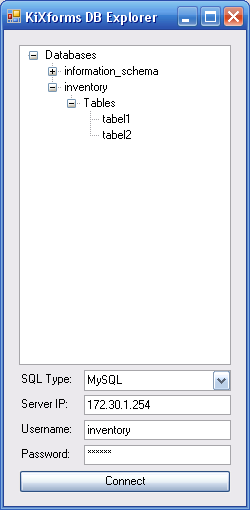
Description:
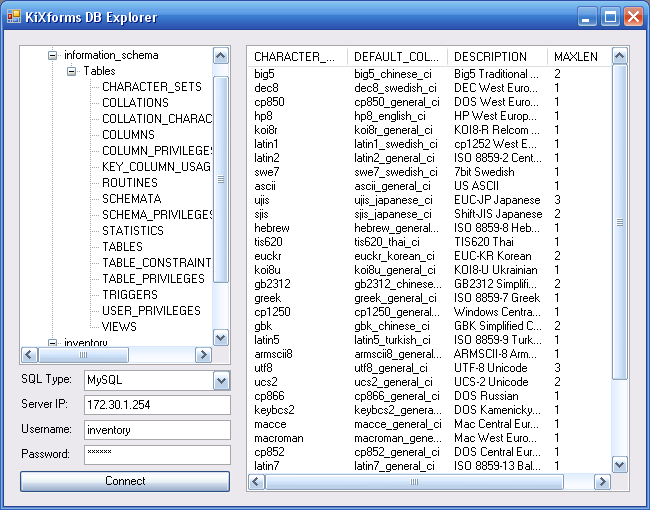
Description:
|
|
Top
|
|
|
|
|
#177686 - 2007-07-10 02:23 PM
Re: SQL Database Explorer
[Re: Lonkero]
|
Arend_
MM club member
Registered: 2005-01-17
Posts: 1896
Loc: Hilversum, The Netherlands
|
A compliment.... coming from you... thanks! 
It shouldn't support it, but you could try it without username and password.
I'll implement it in the next version, as well as MySQL support.
|
|
Top
|
|
|
|
|
#177707 - 2007-07-11 12:54 AM
Re: SQL Database Explorer
[Re: Arend_]
|
NTDOC
Administrator

Registered: 2000-07-28
Posts: 11631
Loc: CA
|
|
|
Top
|
|
|
|
|
#177723 - 2007-07-11 08:28 AM
Re: SQL Database Explorer
[Re: NTDOC]
|
Arend_
MM club member
Registered: 2005-01-17
Posts: 1896
Loc: Hilversum, The Netherlands
|
|
|
Top
|
|
|
|
|
#177780 - 2007-07-11 05:58 PM
Re: SQL Database Explorer
[Re: Shawn]
|
Arend_
MM club member
Registered: 2005-01-17
Posts: 1896
Loc: Hilversum, The Netherlands
|
1) yeah was the intention but the click event also counts + and - in treeview as clicks.. hard to explain why that is a problem
2) yeah, dunno where it's coming from either.
Ideas are always welcome
|
|
Top
|
|
|
|
|
#177781 - 2007-07-11 05:58 PM
Re: SQL Database Explorer
[Re: Shawn]
|
Shawn
Administrator

Registered: 1999-08-13
Posts: 8611
|
I modified your UpdateNode function to reduce flicker... let me know if this is better else, don't use it.
Function UpdateNode
  Dim $SelectedItem, $node, $cna, $rsa, $item, $i
  $TreeView1.Enabled = 0
  $Button1.Enabled = 0
  $SelectedItem = $Treeview1.SelectedNode.Text
  $Node = $Treeview1.SelectedNode
  If Right($Node.Parent.Text,6) = "Tables"
    $Form1.Size = $System.Size(650,510)
    If NOT $ComboBox1.Text = "Microsoft Access"
      $CMDString = $CMDString + "Database="+$Node.Parent.Parent.Text+";"
    EndIf
    $cna = CreateObject("ADODB.Connection")
    $cna.ConnectionTimeOut = 15
    $cna.CommandTimeOut = 30
    $cna.Open($CMDstring)
    If $cna.State <> 1
      $nul= MessageBox($CMDString,"Error",16)
      $nul= MessageBox(@SERROR + @CRLF + @CRLF + "This Script Will Now Close.","Error",16)
      Quit()
    Else
      $=$ListView1.Columns.Clear
      $=$ListView1.Items.Clear
      $rsa = CreateObject("ADODB.RecordSet")
      $rsa.CursorType = 3
      $rsa.LockType = 3
      $rsa.Source = "SELECT * From "+$selecteditem
      $rsa.ActiveConnection = $cna
      $rsa.Open
      $rsa.MoveFirst
      $Form1.UseWaitCursor = 1
      $ListView1.BeginUpdate
      For Each $item in $rsa.Fields
        $=$ListView1.Columns.Add($System.ColumnHeader($item.Name,100,$System.HorizontalAlignment_Left))
      Next
      $rsa.MoveFirst
      While NOT $rsa.EOF
        Dim $x
        $x = 1
        For Each $item in $rsa.Fields
          If $x = 1
            $i=$ListView1.Items.Add($System.ListViewItem($item.Value))
          Else
            $=$i.SubItems.Add($System.ListViewSubItem($item.value))
          EndIf
          $x = $x + 1
        Next
        $rsa.MoveNext
      Loop
    EndIf
    $ListView1.EndUpdate
    $Form1.UseWaitCursor = 0
    $cna.Close
    $rsa.Close
  EndIf
  $TreeView1.Enabled = 1
  $Button1.Enabled = 1
  $node = ""
EndFunction
|
|
Top
|
|
|
|
|
#177782 - 2007-07-11 06:06 PM
Re: SQL Database Explorer
[Re: Shawn]
|
Arend_
MM club member
Registered: 2005-01-17
Posts: 1896
Loc: Hilversum, The Netherlands
|
Works perfect
Only the $ListView1.EndUpdate and the $Form1.UseWaitCursor = 0
Should be Before the ENDIF
Edited by apronk (2007-07-11 06:10 PM)
|
|
Top
|
|
|
|
Moderator: Shawn, ShaneEP, Ruud van Velsen, Arend_, Jochen, Radimus, Glenn Barnas, Allen, Mart
|
1 registered
(Allen)
and 373 anonymous users online.
|
|
|




 from me.


