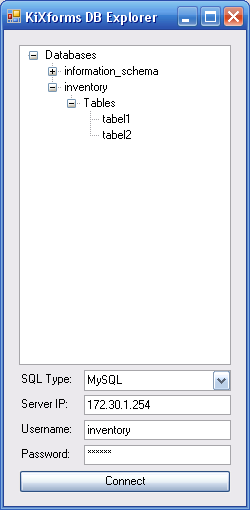
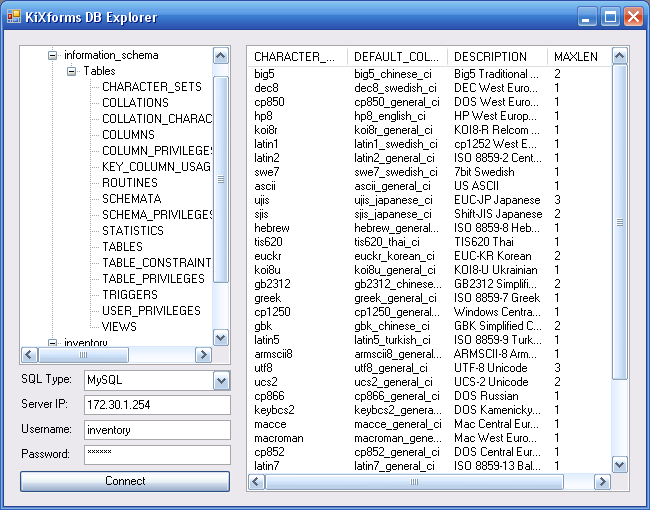
$=SetOption('Explicit','On')

Global $System, $nul, $Form1, $listView1, $TreeView1, $Label0, $Label1, $Label2, $Label3
Global $Panel1, $Panel2, $Splitter1
Global $TextBox1, $TextBox2, $TextBox3, $Button1, $ComboBox1, $CMDString
Global $Margin

$System = CreateObject("Kixforms.System")
If NOT $System
   $nul= MessageBox("KiXforms.Net Not Initiated. This Script Will Now Close.","Error",16)
   Quit()
EndIf
$nul = $System.Application.EnableVisualStyles

$Margin = 10

$Form1 = $System.Form()
$Form1.Left = 345
$Form1.StartPosition = 0  ;FormStartPosition_Manual
$Form1.Size = $System.Size(250,510) ;(Width,Height)
$Form1.Text = "KiXforms DB Explorer"
$Form1.Top = 133

$Panel1 = $System.Panel()
$Panel1.Dock = $System.DockStyle_Fill
$Panel1.DockPadding.All = $MARGIN
$Panel1.DockPadding.Left = 0

$nul = $Form1.Controls.Add($Panel1)

$Splitter1 = $System.Splitter()
$Splitter1.Dock = $System.DockStyle_Left
$Splitter1.MinSize = 175

$nul = $Form1.Controls.Add($Splitter1)

$Panel2 = $System.Panel()
$Panel2.Dock = $System.DockStyle_Left
$Panel2.Width = $Form1.ClientWidth
$nul = $Form1.Controls.Add($Panel2)

$ListView1 = $System.ListView()
$ListView1.FullRowSelect = 1
$ListView1.View = $System.View_Details
$ListView1.Dock = $System.DockStyle_Fill
$nul = $Panel1.Controls.Add($ListView1)

$TreeView1 = $System.TreeView()
$TreeView1.Height = 320
$TreeView1.Left = $MARGIN
$TreeView1.Top = $MARGIN
$TreeView1.Width = $Panel2.ClientWidth - ($MARGIN)
$TreeView1.Click = "UpdateNode()"
$TreeView1.Anchor = 15

$nul = $Panel2.Controls.Add($TreeView1)

$ComboBox1 = $System.ComboBox()
$ComboBox1.Left = 80
$ComboBox1.Text = "Select DB Type..."
$ComboBox1.Top = 340
$ComboBox1.Width = 147
$ComboBox1.SelectedIndexChanged = "DBIndex"
$ComboBox1.Anchor = 2+4+8

$nul = $Panel2.Controls.Add($ComboBox1)
$=$ComboBox1.Items.Add("Microsoft SQL")
$=$ComboBox1.Items.Add("MySQL")
$=$ComboBox1.Items.Add("Microsoft Access")

$Label0 = $System.Label()
$Label0.BorderStyle = 0  ;FixedSingle
$Label0.Left = 15
$Label0.Text = "DB Type:"
$Label0.Top = 342
$Label0.Height = 20
$Label0.Width = 60
$Label0.Anchor = 2+4
$nul = $Panel2.Controls.Add($Label0)

$Label1 = $System.Label()
$Label1.BorderStyle = 0  ;FixedSingle
$Label1.Left = 15
$Label1.Text = "Server IP:"
$Label1.Top = 367
$Label1.Height = 20
$Label1.Width = 60
$Label1.Anchor = 2+4
$nul = $Panel2.Controls.Add($Label1)

$Label2 = $System.Label()
$Label2.BorderStyle = 0  ;FixedSingle
$Label2.Left = 15
$Label2.Text = "Username:"
$Label2.Top = 392
$Label2.Height = 20
$Label2.Width = 60
$Label2.Anchor = 2+4
$nul = $Panel2.Controls.Add($Label2)

$Label3 = $System.Label()
$Label3.BorderStyle = 0  ;FixedSingle
$Label3.Left = 15
$Label3.Text = "Password:"
$Label3.Top = 417
$Label3.Height = 20
$Label3.Width = 60
$Label3.Anchor = 2+4
$nul = $Panel2.Controls.Add($Label3)

$TextBox1 = $System.TextBox()
$TextBox1.Left = 80
$TextBox1.Text = ""
$TextBox1.Top = 365
$TextBox1.Width = 147
$TextBox1.Anchor = 2+4+8
$nul = $Panel2.Controls.Add($TextBox1)

$TextBox2 = $System.TextBox()
$TextBox2.Left = 80
$TextBox2.Text = ""
$TextBox2.Top = 390
$TextBox2.Width = 147
$TextBox2.Anchor = 2+4+8
$nul = $Panel2.Controls.Add($TextBox2)

$TextBox3 = $System.TextBox()
$TextBox3.Left = 80
$TextBox3.Text = ""
$TextBox3.Top = 415
$TextBox3.Width = 147
$TextBox3.PasswordChar = "*"
$TextBox3.Anchor = 2+4+8
$nul = $Panel2.Controls.Add($TextBox3)

$Button1 = $System.Button()
$Button1.Left = 15
$Button1.Text = "Connect"
$Button1.Top = 440 ;415
$Button1.Width = 212
$Button1.Click = "$$=DBConnect()"
$Button1.Anchor = 2+4+8
$nul = $Panel2.Controls.Add($Button1)

;; Adjust form to width of left panel...

$Form1.ClientWidth = $Panel2.Right+$MARGIN

$Form1.Show  ;Displays the Form

While $Form1.Visible
   $Nul = Execute($Form1.DoEvents())
Loop
Exit 0

Function DBIndex
  If $ComboBox1.Text = "Microsoft Access"
    $TextBox1.Enabled = 0
  Else
    $TextBox1.Enabled = 1
  EndIf
endfunction

Function DBConnect
  If $TextBox2.Text <> "" AND $TextBox3.Text <> "" AND $ComboBox1.Text <> "Select SQL Type..."
    If $ComboBox1.Text = "Microsoft SQL"
      If TextBox1.Text <> ""
        $CMDString = 'Driver={SQL Server};Server='+$TextBox1.Text+';uid='+$TextBox2.Text+';pwd='+$TextBox3.Text+';'
        DBControl($CMDString,"SELECT Name FROM SysDatabases")
      Else
        $nul= MessageBox("The Server IP Address is not specified.","Error",16)
      EndIf
    EndIf
    If $ComboBox1.Text = "MySQL"
      If TextBox1.Text <> ""
        $CMDString = 'Driver={MySQL ODBC 3.51 Driver};Option=16387;Server='+$TextBox1.Text+';uid='+$TextBox2.Text+';pwd='+$TextBox3.Text+';'
        DBControl($CMDString,"Show Databases")
      Else
        $nul= MessageBox("The Server IP Address is not specified.","Error",16)
      EndIf
    EndIf
    If $ComboBox1.Text = "Microsoft Access"
      Dim $DBPath, $dbq
      $dbq = CreateObject("userAccounts.commonDialog")
      $dbq.filter = "Microsoft Access Database (*.mdb)|*.mdb"
      $dbq.showopen
      $DBPath = $dbq.fileName
      If $DBPath
        $CMDstring = 'DRIVER={Microsoft Access Driver (*.mdb)};uid='+$TextBox2.Text+';pwd='+$TextBox3.Text+';DBQ='+$DBPath+";"
        DBAccess($DBPath)
      Else
        $nul= MessageBox("There is not Database Selected.","Error",16)
      EndIf
    EndIf
  Else
    $nul= MessageBox("Not all fields are filled.","Error",16)
  EndIf
EndFunction

Function UpdateNode
  Dim $SelectedItem, $node, $cna, $rsa, $item, $i
  $TreeView1.Enabled = 0
  $Button1.Enabled = 0
  $SelectedItem = $Treeview1.SelectedNode.Text
  $Node = $Treeview1.SelectedNode
  If Right($Node.Parent.Text,6) = "Tables"
    $Form1.Size = $System.Size(650,510)
    If NOT $ComboBox1.Text = "Microsoft Access"
      $CMDString = $CMDString + "Database="+$Node.Parent.Parent.Text+";"
    EndIf
    $cna = CreateObject("ADODB.Connection")
    $cna.ConnectionTimeOut = 15
    $cna.CommandTimeOut = 30
    $cna.Open($CMDstring)
    If $cna.State <> 1
      $nul= MessageBox($CMDString,"Error",16)
      $nul= MessageBox(@SERROR + @CRLF + @CRLF + "This Script Will Now Close.","Error",16)
      Quit()
    Else
      $=$ListView1.Columns.Clear
      $=$ListView1.Items.Clear
      $rsa = CreateObject("ADODB.RecordSet")
      $rsa.CursorType = 3
      $rsa.LockType = 3
      $rsa.Source = "SELECT * From "+$selecteditem
      $rsa.ActiveConnection = $cna
      $rsa.Open
      $rsa.MoveFirst
      $Form1.UseWaitCursor = 1
      $ListView1.BeginUpdate
      For Each $item in $rsa.Fields
        $=$ListView1.Columns.Add($System.ColumnHeader($item.Name,100,$System.HorizontalAlignment_Left))
      Next
      $rsa.MoveFirst
      While NOT $rsa.EOF
        Dim $x
        $x = 1
        For Each $item in $rsa.Fields
          If $x = 1
            $i=$ListView1.Items.Add($System.ListViewItem($item.Value))
          Else
            $=$i.SubItems.Add($System.ListViewSubItem($item.value))
          EndIf
          $x = $x + 1
        Next
        $rsa.MoveNext
      Loop
    EndIf
    $ListView1.EndUpdate
    $Form1.UseWaitCursor = 0
    $cna.Close
    $rsa.Close
  EndIf
  $TreeView1.Enabled = 1
  $Button1.Enabled = 1
  $node = ""
EndFunction

Function DBAccess($mdbfile)
  Dim $TreeView1Node0, $cn, $rs, $a, $b
  $TreeView1Node0 = $TreeView1.Nodes.Add($System.TreeNode("MS Access - " + $mdbfile))
  $TreeView1Node0.NodeFont = $System.Font("Microsoft Sans Serif",8.25,0) ;Regular
  $cn = CreateObject("ADODB.Connection")
  $cn.Open("Provider=Microsoft.Jet.OLEDB.4.0;Data Source="+$mdbfile)
  If $cn.State <> 1
    $nul= MessageBox(@SERROR + @CRLF + @CRLF + "This Script Will Now Close.","Error",16)
    Quit()
  EndIf
  $rs = $cn.OpenSchema(20)
  $rs.MoveFirst
  $a = $TreeView1Node0.Nodes.Add($System.TreeNode("Tables"))
  While NOT $rs.EOF
    $b = $A.Nodes.Add($System.TreeNode($rs.Fields.Item("TABLE_NAME")))
    $rs.MoveNext
  Loop
EndFunction

Function DBControl($CNString,$CMDtxt)
  Dim $TreeView1Node0, $cn, $rs, $CNString2, $item, $itm, $cn2, $rs2, $rs3, $a, $b, $c, $d, $e
  $TreeView1.Enabled = 0
  $Button1.Enabled = 0
  $TreeView1Node0 = $TreeView1.Nodes.Add($System.TreeNode("Databases"))
  $TreeView1Node0.NodeFont = $System.Font("Microsoft Sans Serif",8.25,0) ;Regular
  $cn = CreateObject("ADODB.Connection")
  $cn.ConnectionTimeOut = 15
  $cn.CommandTimeOut = 30
  $cn.Open($CNstring)
  If $cn.State <> 1
    $nul= MessageBox(@SERROR + @CRLF + @CRLF + "This Script Will Now Close.","Error",16)
    Quit()
  EndIf
  $rs = CreateObject("ADODB.RecordSet")
  $rs.CursorType = 3
  $rs.LockType = 3
  $rs.Source = $CmdTxt
  $rs.ActiveConnection = $cn
  $rs.Open
  $rs.MoveFirst
  While NOT $rs.EOF
    For Each $item In $rs.Fields
      $cn2 = CreateObject("ADODB.Connection")
      $cn2.ConnectionTimeOut = 15
      $cn2.CommandTimeOut = 30
      $CNstring2 = $CNstring + "Database=" + $item.Value+ ";"
      $cn2.Open($CNString2)
      If $cn2.State <> 1
        $nul= MessageBox(@SERROR + @CRLF + @CRLF + "This Script Will Now Close.","Error",16)
        Quit()
      EndIf

      $a = $TreeView1Node0.Nodes.Add($System.TreeNode($item.Value))
      If $ComboBox1.Text = "Microsoft SQL"
        $b = $A.Nodes.Add($System.TreeNode("U-Type Tables"))
        $c = $A.Nodes.Add($System.TreeNode("V-Type Tables"))

        $rs2 = CreateObject("ADODB.RecordSet")
        $rs2.CursorType = 3
        $rs2.LockType = 3
        $rs2.Source = "SELECT Name FROM SysObjects Where Type='U'"
        $rs2.ActiveConnection = $cn2
        $rs2.Open
        $rs2.MoveFirst
        While NOT $rs2.EOF
          For Each $itm In $rs2.Fields
            $d = $b.Nodes.Add($System.TreeNode($itm.Value))
          Next
          $rs2.MoveNext
        Loop
        $rs2.Close

        $rs3 = CreateObject("ADODB.RecordSet")
        $rs3.CursorType = 3
        $rs3.LockType = 3
        $rs3.Source = "SELECT Name FROM SysObjects Where Type='V'"
        $rs3.ActiveConnection = $cn2
        $rs3.Open
        $rs3.MoveFirst
        While NOT $rs3.EOF
          For Each $itm In $rs3.Fields
            $e = $c.Nodes.Add($System.TreeNode($itm.Value))
          Next
          $rs3.MoveNext
        Loop
        $rs3.Close
      EndIf
      If $ComboBox1.Text = "MySQL"
        $b = $A.Nodes.Add($System.TreeNode("Tables"))
        $rs2 = CreateObject("ADODB.RecordSet")
        $rs2.CursorType = 3
        $rs2.LockType = 3
        $rs2.Source = "Show Tables"
        $rs2.ActiveConnection = $cn2
        $rs2.Open
        $rs2.MoveFirst
        While NOT $rs2.EOF
          For Each $itm In $rs2.Fields
            $d = $b.Nodes.Add($System.TreeNode($itm.Value))
          Next
          $rs2.MoveNext
        Loop
        $rs2.Close
      EndIf
      $cn2.Close
    Next
    $rs.MoveNext
  Loop
  $rs.Close
  $cn.Close
  $TreeView1.Enabled = 1
  $Button1.Enabled = 1
EndFunction